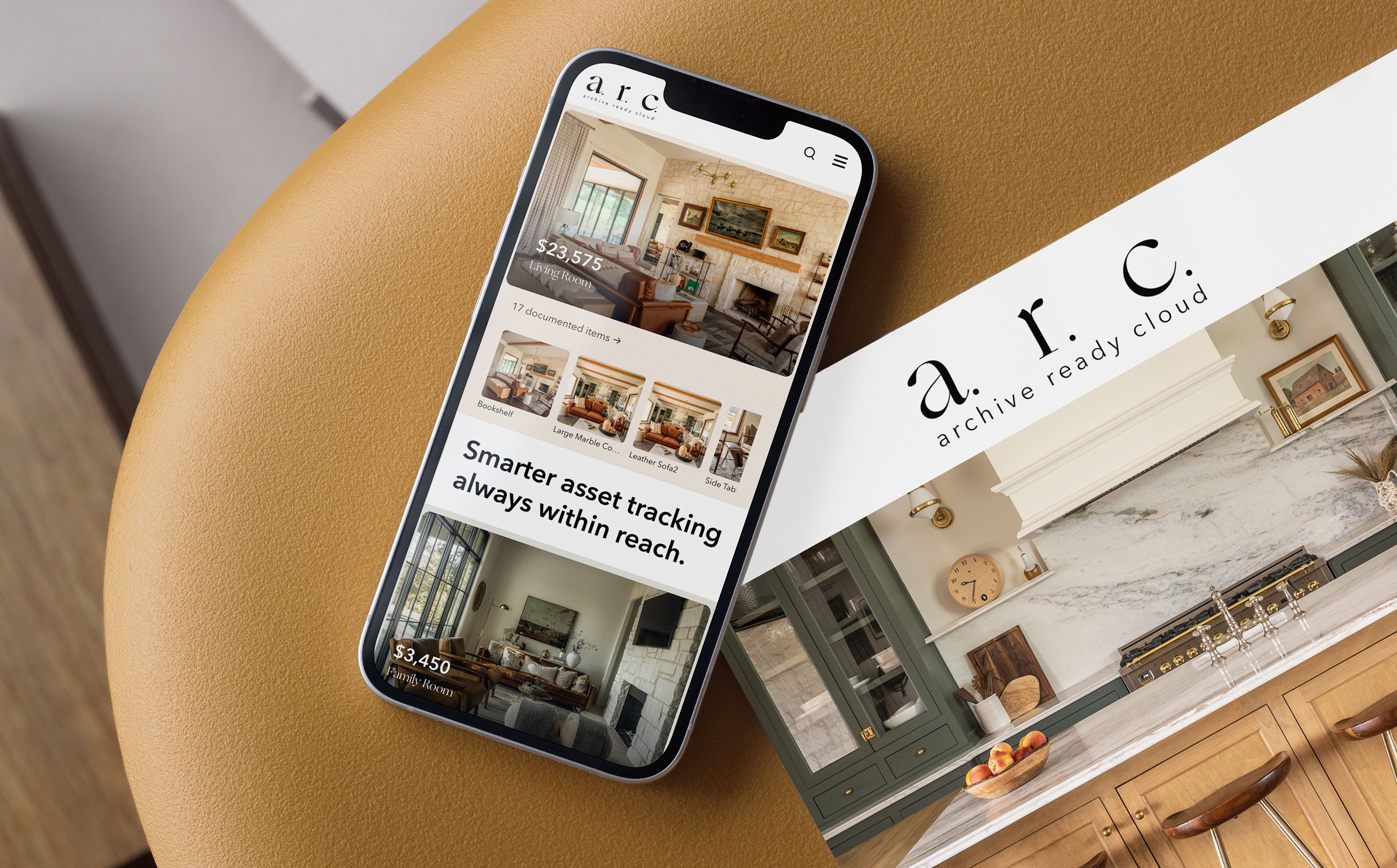
A.R.C. Archive. Ready. Cloud.
A computer vision system for residential asset documentation and insurance gap analysis. Designed, engineered, and shipped by a single builder.
Field Home Inventory Computer Vision Insurance Technology
Author Jeremy Prasatik Published: 2024 Status: V1 Live In market
Classification Product Design Brand Identity Full-Stack Engineering Go-to-Market
Abstract
Home inventory is a solved problem that nobody has solved well. The average American household contains approximately 300,000 items with a combined insurable value that most homeowners have never calculated. Existing documentation tools are spreadsheets with better packaging. Manual entry, manual categorization, manual everything. The math is predictable: 60% of homeowners are underinsured because they've never cataloged what they own.
A.R.C. applies computer vision to the problem. Point a camera at a room. The system identifies objects, estimates replacement value, assigns categories, and archives everything against a structured database. The financial layer calculates total documented assets against insurance policy limits and flags coverage gaps before a claim becomes necessary.
The entire product was designed, engineered, branded, and brought to market by one person working nights and weekends alongside a full-time creative director role. Python backend. Streamlit frontend. OpenAI Vision API for object recognition. Deployed on Vercel with Supabase handling data persistence. Concept to live product in weeks, not quarters.
The Documentation Barrier
60% of American homeowners are underinsured because they've never cataloged what they own. The tools that exist haven't changed the math. Manual entry remains the barrier.
Based on industry estimates of homeowner documentation rates and average coverage gaps.


The insurance industry operates on a fundamental asymmetry. Carriers know exactly what they'll pay on a policy. Homeowners rarely know what they'd need to claim. This gap widens with every purchase, every gift, every inherited piece that enters a home without documentation.
Standard homeowner's policies cover personal property at 50-70% of the dwelling coverage amount. A home insured at $400,000 carries roughly $200,000-$280,000 in personal property coverage. Whether that number is adequate depends entirely on whether the homeowner knows what they own and what it costs to replace. Most don't.
The documentation process is the barrier. Open a spreadsheet. Walk room to room. Describe each item. Research replacement values. Photograph everything. Attach receipts. The estimated time to properly inventory an average home: 40+ hours. The percentage of homeowners who complete this process: single digits.
The market has tried. Apps exist. They fall into two categories.
The first is the glorified spreadsheet. Manual entry fields. Manual photo attachment. Manual value assignment. The app adds a database and maybe a cloud sync, but the work is identical to the spreadsheet it replaced. The friction that prevents documentation remains fully intact.
The second is the insurance carrier tool. Built by or for specific insurers, locked to their ecosystem, designed primarily to streamline claims processing rather than empower the homeowner. The interface reflects the priority: functional, utilitarian, built for adjusters who already know what they're looking at.
Neither category addresses the core problem. Documentation is tedious because identification and valuation require human judgment on every single item.
Computer vision changes the input. Instead of describing what you own, you show it. The system observes, identifies, and classifies. The human role shifts from data entry to data review. Confirmation instead of creation.
This reframes the entire experience. The 40-hour inventory becomes a room-by-room scan measured in minutes. The barrier drops from prohibitive to trivial.
A.R.C. was built on this premise. Reduce the input friction to nearly zero. Let the technology handle observation. Let the human handle judgment.
The Insurance Reality
The insurance industry operates on a fundamental asymmetry. Carriers know exactly what they'll pay on a policy. Homeowners rarely know what they'd need to claim. This gap widens with every purchase, every gift, every inherited piece that enters a home without documentation.
Standard homeowner's policies cover personal property at 50-70% of the dwelling coverage amount. A home insured at $400,000 carries roughly $200,000-$280,000 in personal property coverage. Whether that number is adequate depends entirely on whether the homeowner knows what they own and what it costs to replace. Most don't.
The documentation process is the barrier. Open a spreadsheet. Walk room to room. Describe each item. Research replacement values. Photograph everything. Attach receipts. The estimated time to properly inventory an average home: 40+ hours. The percentage of homeowners who complete this process: single digits.
Existing Solutions
The market has tried. Apps exist. They fall into two categories.
The first is the glorified spreadsheet. Manual entry fields. Manual photo attachment. Manual value assignment. The app adds a database and maybe a cloud sync, but the work is identical to the spreadsheet it replaced. The friction that prevents documentation remains fully intact.
The second is the insurance carrier tool. Built by or for specific insurers, locked to their ecosystem, designed primarily to streamline claims processing rather than empower the homeowner. The interface reflects the priority: functional, utilitarian, built for adjusters who already know what they're looking at.
Neither category addresses the core problem. Documentation is tedious because identification and valuation require human judgment on every single item.
The Vision Layer
Computer vision changes the input. Instead of describing what you own, you show it. The system observes, identifies, and classifies. The human role shifts from data entry to data review. Confirmation instead of creation.
This reframes the entire experience. The 40-hour inventory becomes a room-by-room scan measured in minutes. The barrier drops from prohibitive to trivial.
A.R.C. was built on this premise. Reduce the input friction to nearly zero. Let the technology handle observation. Let the human handle judgment.

Every room tells a story. I built the system that remembers it.

System Architecture & Recognition Engine.
A single photograph triggers a six-stage recognition pipeline.
The image passes through vision processing, object identification, value estimation, and archival. Each stage feeds the next. Each decision point governed by confidence thresholds. Processing time measured under typical indoor lighting conditions.

Image Capture
User photographs a room or individual item using their device camera. No special hardware. No calibration. Standard smartphone optics.
Archive Entry
The documented item enters the user's structured inventory. Linked to a room, tagged with metadata, associated with its source photograph, and immediately included in aggregate calculations.

Vision Processing
OpenAI Vision API receives the image and returns structured analysis. Object identification, material detection, style classification, condition assessment, estimated era or manufacture period.
Financial Analysis
Total documented value updates in real time. The system compares cumulative asset value against the user's stated policy limits. When documented assets approach or exceed coverage thresholds, the shortfall shows up as a specific dollar amount. The homeowner sees it before a disaster reveals it.

Value Estimation
Identified objects are matched against market replacement data. The system estimates current replacement cost, not depreciated value or original purchase price. Replacement cost is the insurance-relevant metric.
Category Assignment
Each item is classified into a taxonomy: furniture, electronics, artwork, appliances, fixtures, textiles, collectibles, vehicles, tools, sporting goods, musical instruments, jewelry, documents. Sub-categories provide additional granularity.
Classification System
Taxonomy designed for insurance relevance, not retail categorization. Each category maps to standard personal property claim classifications.
Sub-categories provide the granularity needed for accurate valuation without requiring specialized knowledge from the user. Aligned with classifications used by major U.S. carriers.
Scroll to explore →

Insurance Gap Analysis
Where the product stops being an inventory tool and becomes a risk management system.
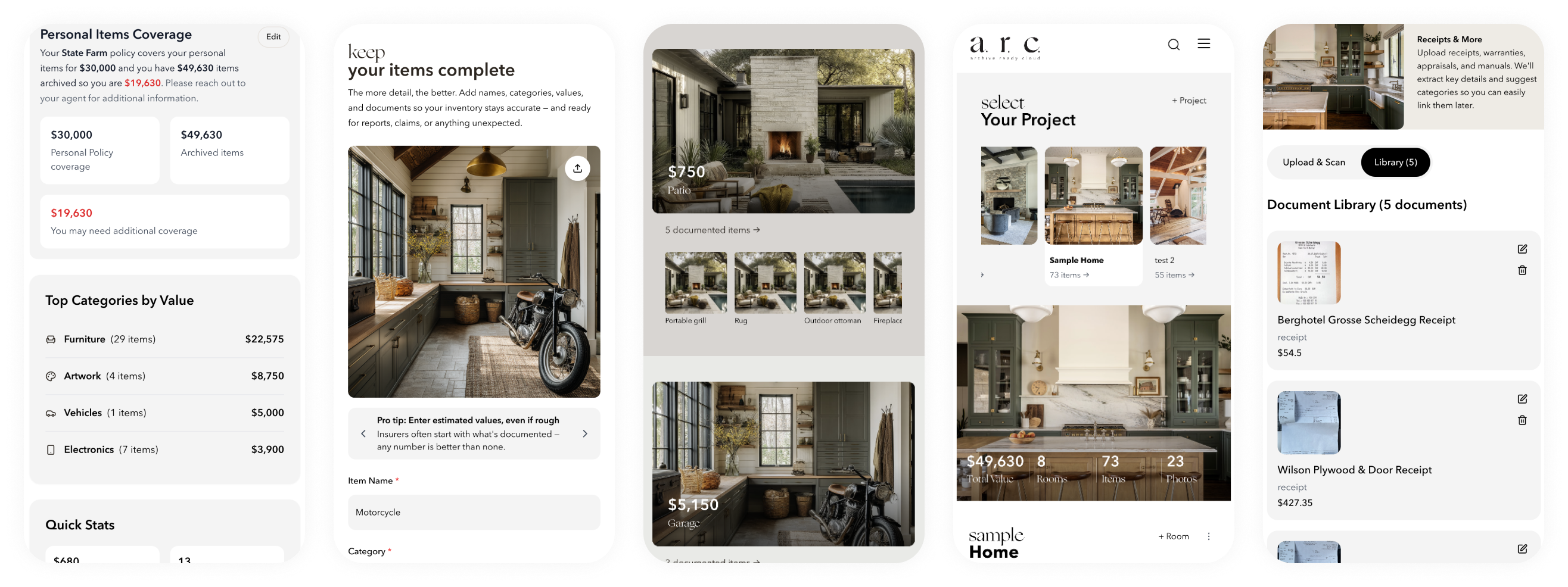
Documented asset value compared against user-reported policy limits. Gap shown as a specific dollar amount before a disaster reveals it.
Every documented item contributes to a running total. That total is compared against the user's stated policy limit for personal property coverage. The math is simple. The insight is not.
Most homeowners set their personal property coverage when they purchase the policy and never revisit it. Meanwhile, the contents of their home change continuously. New furniture. Upgraded appliances. Gifts. Inherited pieces. A home that was adequately covered five years ago may be $50,000 underinsured today without the homeowner knowing.
A.R.C. makes the gap visible. Not as an abstract concept. As a specific dollar amount tied to specific documented items in specific rooms.
Scroll to explore →

Visual Identity & Design Language
The brand had to solve a tension. Home inventory sounds like a chore. Insurance analysis sounds like a meeting with your agent. Neither association invites engagement. The visual identity needed to make documentation feel like something worth doing, not something you should get around to eventually.
Editorial warmth applied to utility software. Magazine sensibility meets insurance rigor.
Chromatic brand circle
Primary
#B1BC94
RGB 177/188/148
Warm Register
#C4A265
Photography tones
Ground
#000000
Structure, text
Brand philosophy
The solution was editorial warmth applied to utility software. Magazine sensibility meets insurance rigor. The interface treats data as something worth designing, not just storing. Asset cards that feel like collection entries. Room views that read like curated galleries. Financial summaries that carry the weight of their content without the sterility of a spreadsheet.
The same philosophy extends to the documentation experience itself. Scanning a room should feel considered, not clinical. Reviewing your inventory should feel like browsing a personal archive, not auditing a warehouse. The brand language exists to make the practical feel purposeful.
Ogg Primary Typeface
Warm, editorial, slightly elevated. Carries the brand's emotional register. Headlines, feature names, moments of consideration.
Avenir Next Secondary Typeface, Medium
Clean, neutral, highly legible. Carries the product's utility layer. Data labels, navigation, body text, interface clarity.
Avenir Next Secondary Typeface, Demi Bold
Structural emphasis. Section labels, key data points, navigational hierarchy. Weight that signals importance without shouting.
Ogg Regular
Brand grey RGB: 177/188/148 #B1BC94 CMYK 34/16/50/0
Avenir Next Medium
Brand grey RGB: 177/188/148 #B1BC94 CMYK 34/16/50/0
Avenir Next Demi Bold
Brand grey RGB: 177/188/148 #B1BC94 CMYK 34/16/50/0
Avenir Next Regular
Brand grey RGB: 177/188/148 #B1BC94 CMYK 34/16/50/0


Solo Engineering Concept to Deployment
One person. Ten weeks. Concept to live product in the App Store.
AI-assisted development with Claude Code as the primary environment. Python backend, Streamlit frontend, deployed on Vercel. No engineering team, no QA department.
No engineering team. No product manager assigning tickets. No design review board. No QA department. One person identifying the problem, designing the solution, writing the code, testing the output, fixing what broke, and shipping the result.
This isn't a limitation narrative. It's a velocity argument. The feedback loop between identifying a problem and deploying a fix is measured in hours, not sprints. A UX friction point noticed during testing gets resolved in the same session. A feature idea that shows up during development gets prototyped immediately. The distance between intention and execution is as short as it can possibly be.
The tradeoff is real. Solo development means every decision is a prioritization decision. What ships now versus what ships later. What gets refined versus what gets functional. V1 is an honest assessment of those tradeoffs: comprehensive in scope, considered in design, pragmatic in implementation.
Claude Code served as the primary development environment. The workflow: describe the intended behavior in natural language. Review the generated code. Test the output. Refine through conversation. Ship.
This approach inverts the traditional bottleneck. The constraint is no longer syntax knowledge or framework expertise. It's clarity of intention. Knowing exactly what the product should do matters more than knowing exactly how to make it do it.
The same AI-assisted methodology that powers A.R.C.'s computer vision also powered its creation. A product built with AI, built to use AI, built by someone who understands both sides of that equation.
Week 1-2: Core concept validation. Can computer vision reliably identify household items from standard smartphone photographs? Testing across lighting conditions, angles, room types. The answer was yes, with caveats that informed the UX design.
Week 3-4: Product architecture. Database schema. User flow. Room and item data models. Authentication. Storage. The foundational decisions that everything else builds on.
Week 5-6: Interface design and implementation. Simultaneously designing and building. The luxury of solo development: no handoff gap between design intent and code reality.
Week 7-8: Financial layer. Insurance gap calculations. Policy limit comparisons. The feature that transforms a documentation tool into a risk management product.
Week 9-10: Brand identity. Visual system. Marketing site. Go-to-market preparation. Launch. Weeks, not months. Not quarters. Not fiscal years. Weeks.
The Builder Reality
No engineering team. No product manager assigning tickets. No design review board. No QA department. One person identifying the problem, designing the solution, writing the code, testing the output, fixing what broke, and shipping the result.
This isn't a limitation narrative. It's a velocity argument. The feedback loop between identifying a problem and deploying a fix is measured in hours, not sprints. A UX friction point noticed during testing gets resolved in the same session. A feature idea that shows up during development gets prototyped immediately. The distance between intention and execution is as short as it can possibly be.
The tradeoff is real. Solo development means every decision is a prioritization decision. What ships now versus what ships later. What gets refined versus what gets functional. V1 is an honest assessment of those tradeoffs: comprehensive in scope, considered in design, pragmatic in implementation.
AI-Assisted Development
Claude Code served as the primary development environment. The workflow: describe the intended behavior in natural language. Review the generated code. Test the output. Refine through conversation. Ship.
This approach inverts the traditional bottleneck. The constraint is no longer syntax knowledge or framework expertise. It's clarity of intention. Knowing exactly what the product should do matters more than knowing exactly how to make it do it.
The same AI-assisted methodology that powers A.R.C.'s computer vision also powered its creation. A product built with AI, built to use AI, built by someone who understands both sides of that equation.
Development Timeline
Week 1-2: Core concept validation. Can computer vision reliably identify household items from standard smartphone photographs? Testing across lighting conditions, angles, room types. The answer was yes, with caveats that informed the UX design.
Week 3-4: Product architecture. Database schema. User flow. Room and item data models. Authentication. Storage. The foundational decisions that everything else builds on.
Week 5-6: Interface design and implementation. Simultaneously designing and building. The luxury of solo development: no handoff gap between design intent and code reality.
Week 7-8: Financial layer. Insurance gap calculations. Policy limit comparisons. The feature that transforms a documentation tool into a risk management product.
Week 9-10: Brand identity. Visual system. Marketing site. Go-to-market preparation. Launch. Weeks, not months. Not quarters. Not fiscal years. Weeks.

Application Views & Data Architecture
Every view designed to make the practical feel purposeful. Documentation as curated archive.
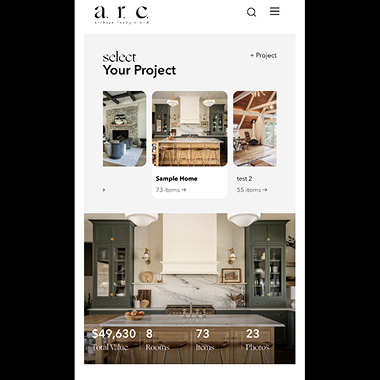
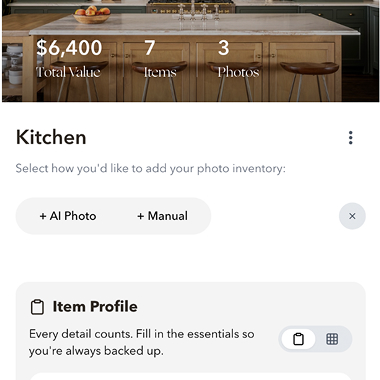
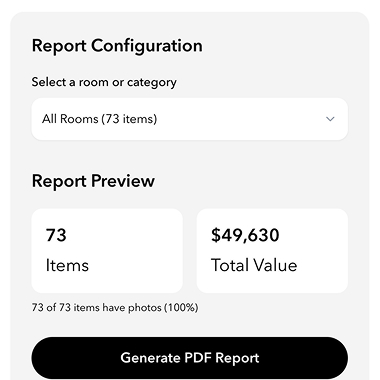
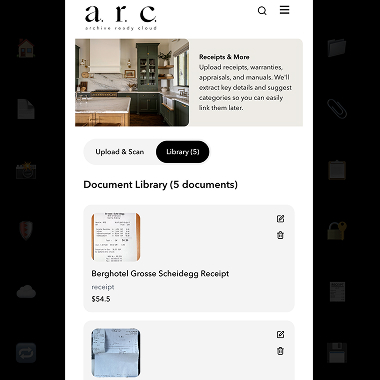
Dashboard, room, item detail, and report views. All screens reflect V1 production application with representative usage data.
Dashboard View
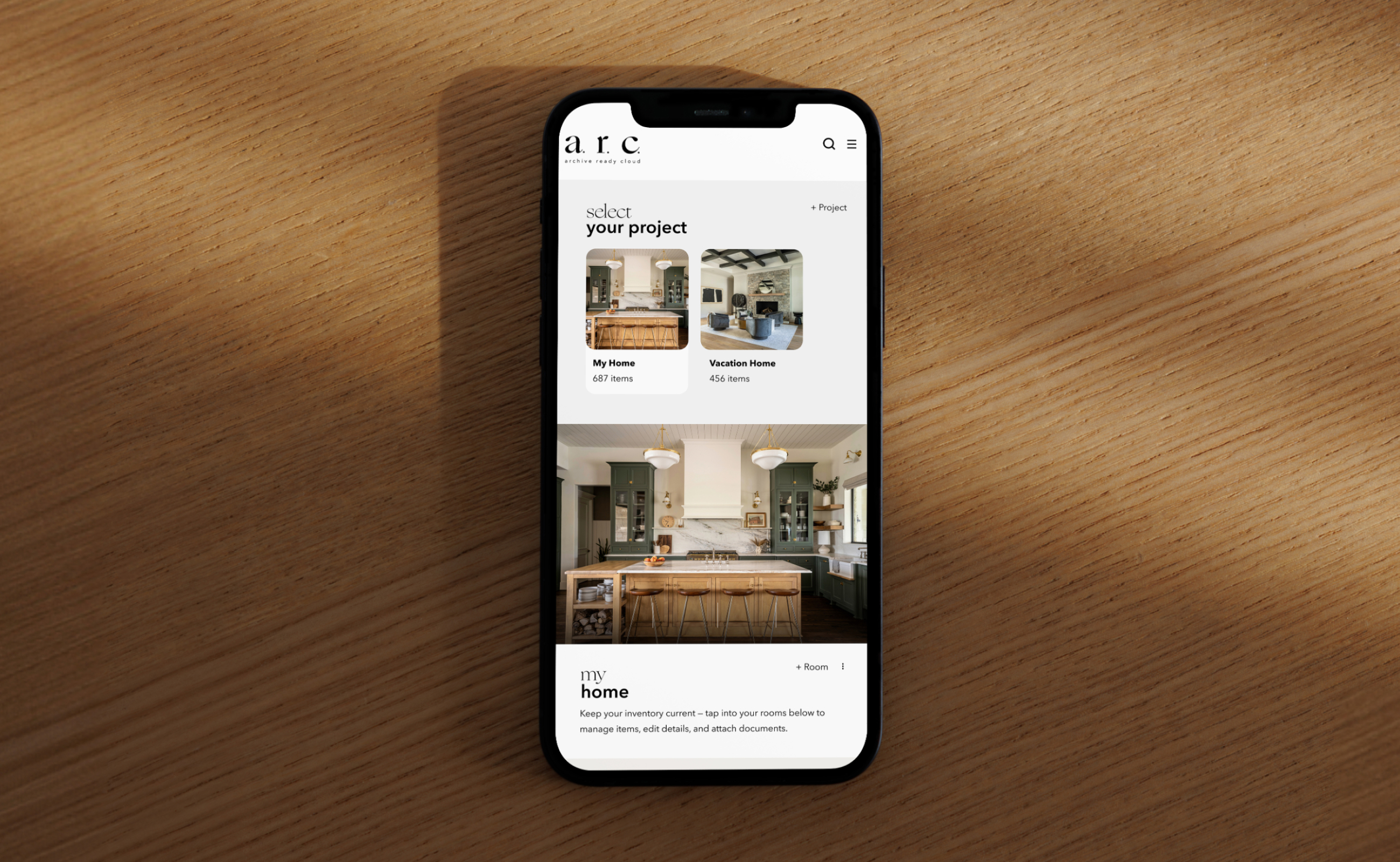
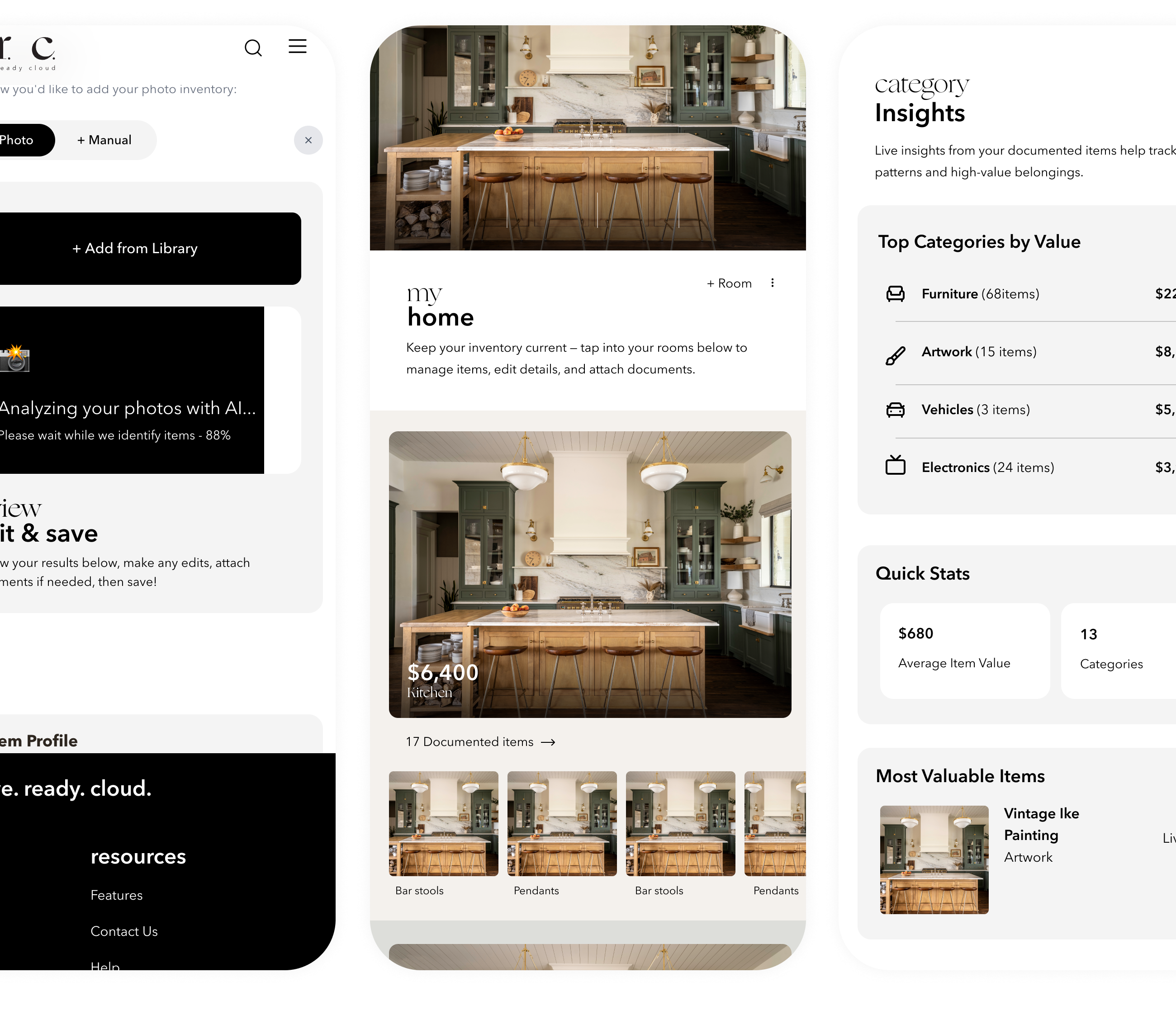
The home screen presents aggregate intelligence. Total items documented. Total estimated value. Category breakdown. Coverage status. Recent activity. The information hierarchy prioritizes financial awareness: what you own, what it's worth, whether you're covered.
Room View
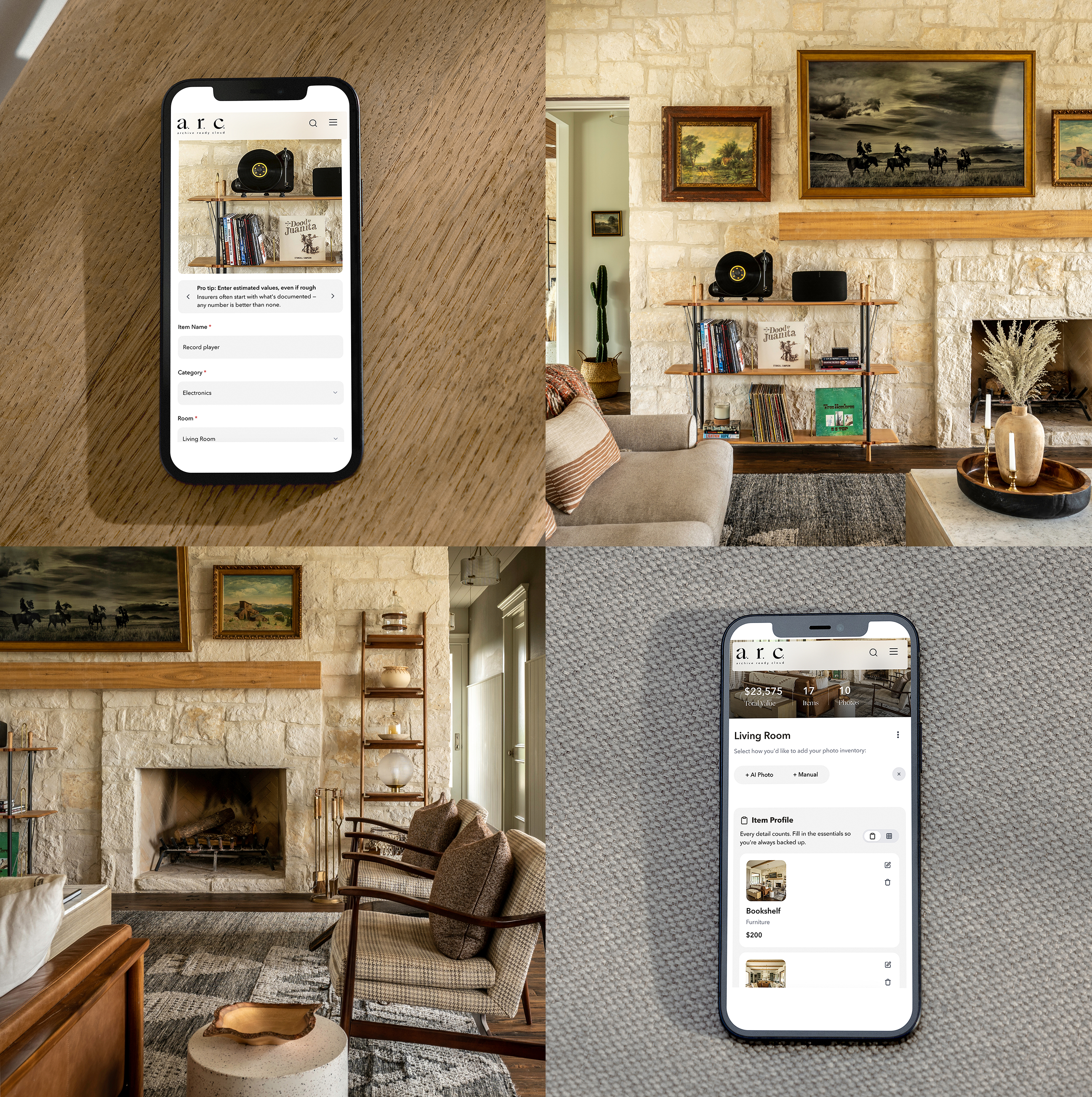
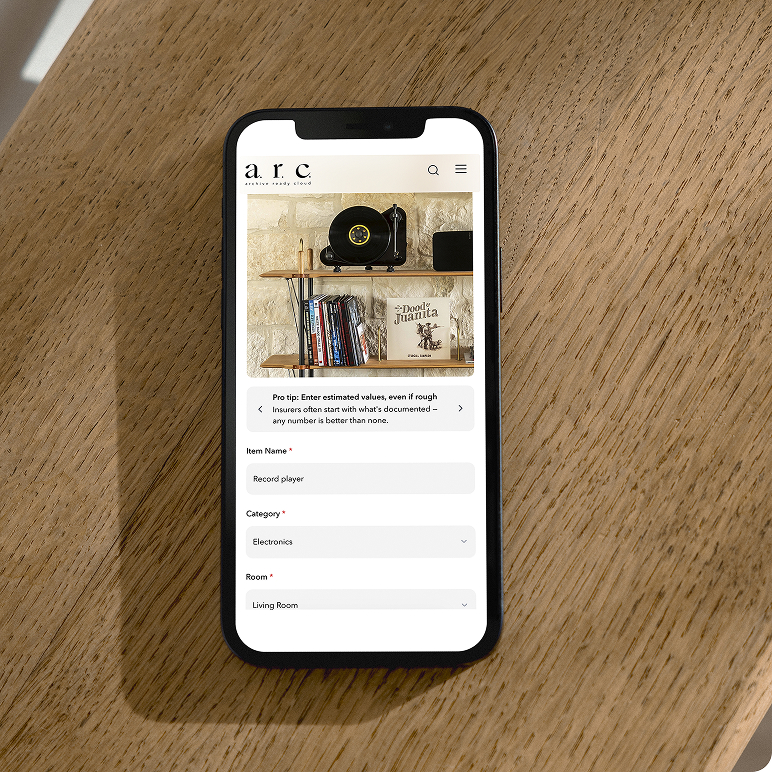
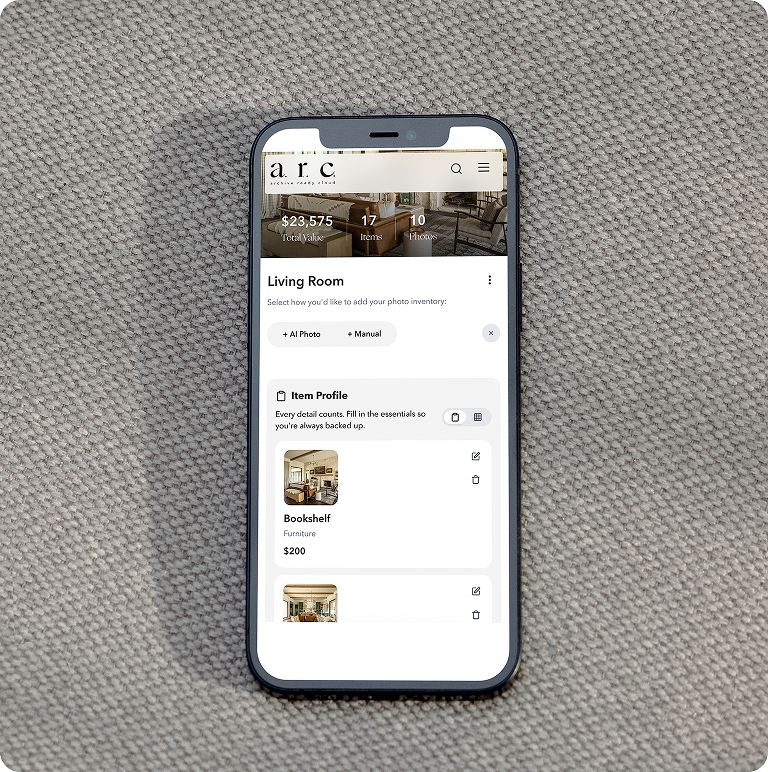
Each documented room functions as a contained archive. Items displayed as cards with thumbnail, name, category, and value. Sortable by value, category, or date added. The room becomes a gallery of your own possessions, organized for both browsing and analysis.
Document AI
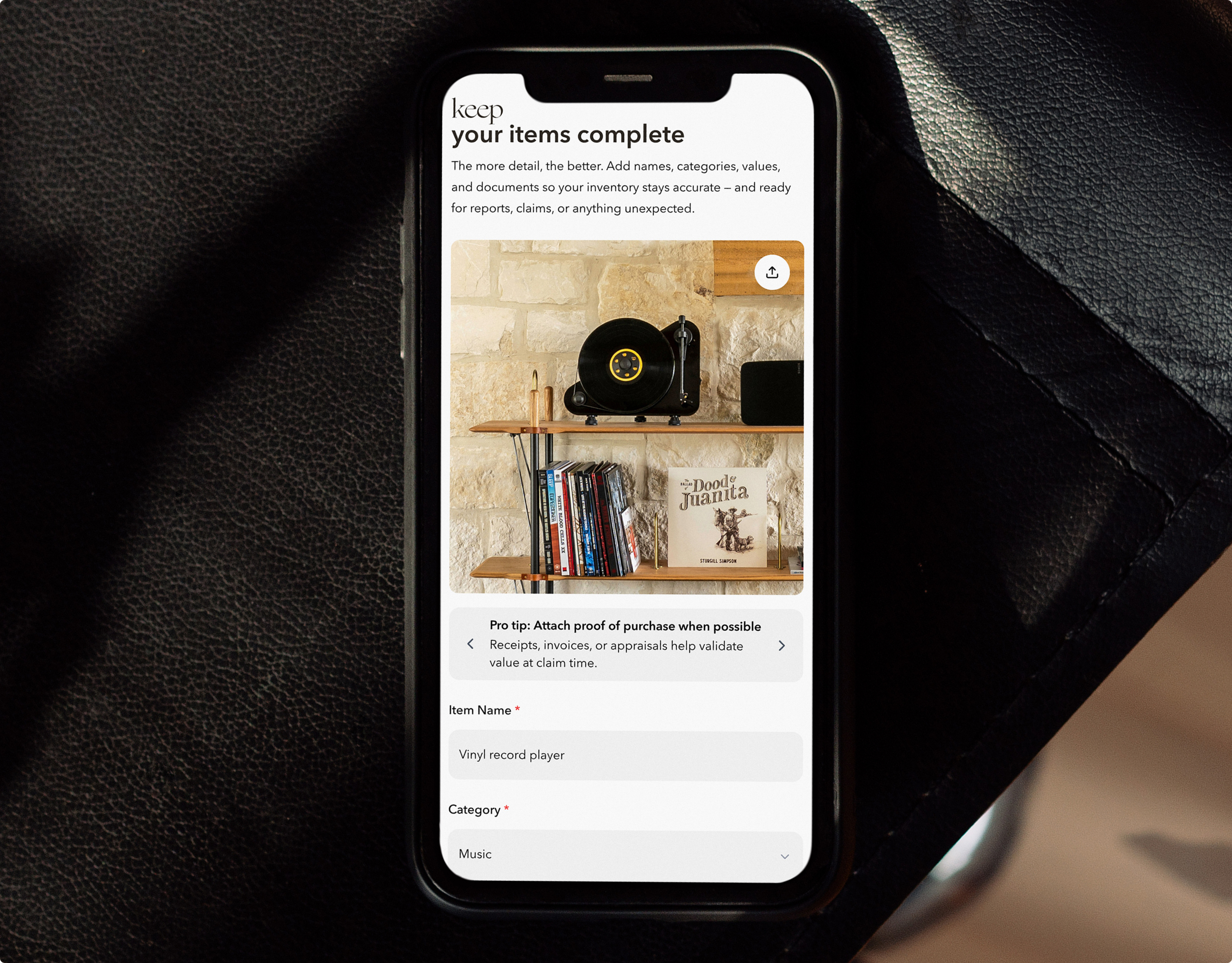
Upload a receipt, appraisal, warranty, or insurance document. AI extracts relevant details: purchase date, amount, vendor, coverage terms. The extracted data associates with the corresponding item automatically when possible, or prompts the user for assignment.
Reports
Generate PDF summaries for insurance review, estate planning, or personal reference. Configurable by room, category, or full home. Includes item photographs, descriptions, values, and aggregate statistics. Formatted for professional presentation to agents or advisors.
Scroll to explore →
Field Observations
Traditional manual inventory of a 73-item home: estimated 8-12 hours. A.R.C. documentation of the same scope: under 30 minutes. Reduction factor: 16-24x.
Metrics reflect V1 usage since launch. Early-stage numbers. Presented without inflation.
DEVELOPMENT TIMELINE
10 weeks, concept to launch
Scroll to explore →

Currently in Market V1 Live
Built because the person who made it needed it. A renovated house, years of collected objects, and nothing documented.
V1 live and in market. V2 roadmap includes native architecture migration, enhanced scanning precision, and deeper financial analysis.
Services
Product Design
Brand Identity
Full-Stack Engineering
Go-to-Market Strategy
Stack
Python
Streamlit
OpenAI Vision API
Supabase
Vercel
Claude Code
Links
A single person with design experience, AI tools, and a real problem to solve shipped a complete product. Not a prototype. Not a demo. A live application in the App Store with paying users and a roadmap.
V2 migrates the full stack to a native architecture. More precise scanning. Faster processing. Deeper financial analysis. The foundation built in V1 supports everything planned without a rebuild.
The larger point extends beyond this specific product. The tools exist now for designers who think in systems to build the systems they think about. The gap between vision and execution isn't technical anymore. It's about willingness to ship. A.R.C. shipped.